Pitch Tracking#
Most casual scorers skip pitch tracking entirely, and that’s fine — you can run a complete scorecard without recording a single pitch. But once you start tracking pitches, you’ll wonder why you ever stopped. Pitch counts tell you when a starter is getting tired. Sequences reveal what a pitcher is throwing in hitter’s counts. And at the end of a game, the full pitch log is the richest storytelling layer your scorecard has.
There are two ways to track pitches: the full pitch-by-pitch method, which records every delivery with its result, and the no-track method, which lets you skip straight to the at-bat outcome. Most serious scorers use full tracking; no-track is handy when you’re falling behind and just need to keep the game moving.
Why Track Pitches?#
Pitch count awareness. A starter who throws 30 pitches in the first inning is in trouble by the fifth. Tracking pitches lets you watch this in real time — you’ll know before the manager does that the bullpen call is coming.
Strikeout analysis. There’s a meaningful difference between a swinging strikeout and a called third strike. Swinging Ks suggest the batter is chasing; called Ks suggest they got caught looking — often at a pitch on the corner they didn’t expect. Tracking both separately gives you a richer picture of who’s controlling the at-bat.
Historical record. A scorecard with full pitch data is a primary source. Decades from now, you’ll know not just that a batter struck out in the sixth, but that he went down swinging on a 1-2 count after fouling off three pitches.
The Two Tracking Modes#
Full Pitch-by-Pitch Tracking#
On a traditional paper scorecard, pitch tracking is usually minimal: three small boxes for balls and two for strikes, and you fill them in as the count progresses. Some scorers put a dot in each box; others write a letter (C for called, S for swinging, F for foul) to capture more detail. Either way, the paper method records the final count — you know the at-bat ended on a 3-2 count, but you don’t know what happened on each individual pitch, and you can’t tell the difference between a 10-pitch at-bat with six fouls and a quick 5-pitch count.
The count progresses as you record pitches. After four balls, the batter walks. After three strikes — swinging or called — the batter is out, except that a foul ball with two strikes doesn’t count as the third strike (unless it’s a bunted foul, which does).
Digital scoring changes this significantly. Instead of a fixed grid of boxes, BaseballScorer records every pitch in sequence — including all those two-strike fouls that paper scorecards lose. A 12-pitch at-bat where the batter fouled off seven pitches before drawing a walk shows all 12 dots in order, telling the full story of an epic plate appearance that paper would compress to “3-2, BB.”
No-Track Mode#
Sometimes you just need the result. No-track mode skips the pitch sequence entirely and lets you record the outcome directly: strikeout, walk, hit by pitch, or ball in play. You lose the pitch count and sequence data, but the game keeps moving. This is useful when you’re scoring solo and the action is coming faster than you can write.
Pitch Dot Colors#
When scoring digitally, pitches are often represented as colored dots — one dot per pitch, arranged in sequence within the at-bat. The color tells you what happened on that pitch at a glance:
| Color | Meaning |
|---|---|
| Green | Ball |
| Orange | Called strike (looking) |
| Red | Swinging strike |
| Yellow | Foul ball |
| Purple | Hit by pitch |
| Blue | In play (at-bat ends) |
This color-coded dot notation is, as far as we’re aware, unique to BaseballScorer. Traditional paper scorecards track only the final count; broadcast graphics sometimes color-code by pitch type (fastball vs. slider). The dot system instead encodes each pitch result in sequence, so you can read the full story of an at-bat from a single row of colored dots.
A long string of green and yellow means the batter fought off a lot of pitches. A quick orange-red-red means they never got comfortable.

How Foul Balls Work#
Foul balls are strikes — but only up to two. A foul with zero or one strike counts as a strike. A foul with two strikes keeps the count at two strikes. The at-bat continues. A batter can theoretically foul off infinite pitches at two strikes and never strike out — unless they bunt the ball foul, which is the third strike and ends the at-bat.
This is why two-strike foul balls are worth tracking separately: a batter who fights off six two-strike fouls before walking is demonstrating elite plate discipline. The pitch count tells that story; the final result (BB) doesn’t.
In BaseballScorer#
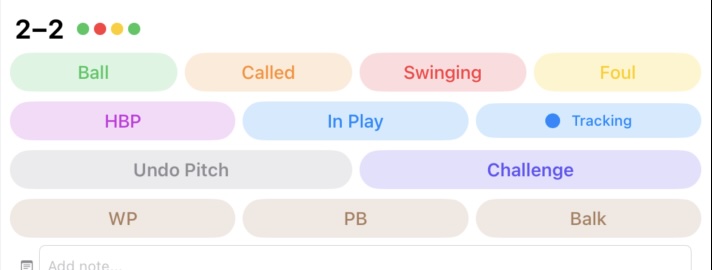
BaseballScorer defaults to full pitch-by-pitch tracking. Six buttons appear at the bottom of each active at-bat card:
- Ball (green) — records a ball; count advances
- Called Strike (orange) — records a called strike; count advances
- Swinging Strike (red) — records a swinging strike; count advances
- Foul (yellow) — records a foul; only advances count if fewer than 2 strikes
- HBP (purple) — records hit by pitch and ends the at-bat
- In Play (blue) — signals the ball was put in play; opens the outcome entry flow
Auto-conclusions handle the counting for you:
- 4 balls automatically records a walk (BB) and closes the at-bat
- 3rd swinging strike automatically records a strikeout (K) and closes the at-bat
- 3rd called strike automatically records a called strikeout (Kc, the backwards K) and closes the at-bat
- Foul at 2 strikes records the foul dot but leaves the count at 2 strikes — no accidental strikeouts
The ball-strike count is displayed in “balls-strikes” format (e.g., “2-1”) and updates after every pitch.
To switch to no-track mode, tap the mode toggle in the at-bat controls. In no-track mode, the pitch buttons are replaced with direct result buttons: K, Kc, BB, HBP, IBB, and In Play. No dots are recorded, no count is shown — just the outcome.
See strikeouts for the notation differences between K and Kc, and walks and HBP for how auto-walk interacts with intentional walks.
The Challenge System#
In MLB, managers can challenge certain calls using instant replay. BaseballScorer supports this: you can flag a pitch call as challenged. If the call is upheld, the original pitch dot is circled — a visual flag that it was reviewed but unchanged. If the challenge is overturned, the original pitch appears as a hollow circle (voided) followed by the corrected pitch, and both are enclosed in a capsule. You can see at a glance what was originally called and what it became. See Challenges for full details and screenshots.
Pitch Counts on the Scorecard#
At the end of each half-inning, the running pitch count for each pitcher is a useful sidebar to maintain. On paper, many scorers tally this in the margin. In a digital system, it can be computed automatically from the dot count per pitcher.
Starters are typically on a 100-pitch guideline in modern MLB, though managers vary. Tracking pitches lets you anticipate substitutions and understand bullpen usage — context that makes the late innings much more interesting to follow.